Authorized portal users can add or remove eligible record associations, while administrators control the related-record fields shown on association cards.
Configure an association card
- Open the object configuration in https://app.woodsportal.com.
- Open the association-card builder.
- Choose the related object and card context.
- Add and order the permitted properties shown on the card.
- Keep the card within the current maximum of eight configured properties.
- Save and compare the portal card with the builder configuration.
Associate a record
- Open the record or configured form that exposes association actions.
- Choose the related object.
- Search for and select an authorized related record.
- Confirm the association.
- Verify that the related record appears in the configured association surface.
Remove an association
- Open the related-record surface.
- Choose the remove or disassociate action for the intended relationship.
- Confirm the action when prompted.
- Verify that the relationship is removed without deleting either CRM record.
Requirements
- Association changes require write permission and an eligible configured relationship.
- Reading an association does not automatically allow the user to change it.
- Card fields are controlled independently from full record-detail fields.
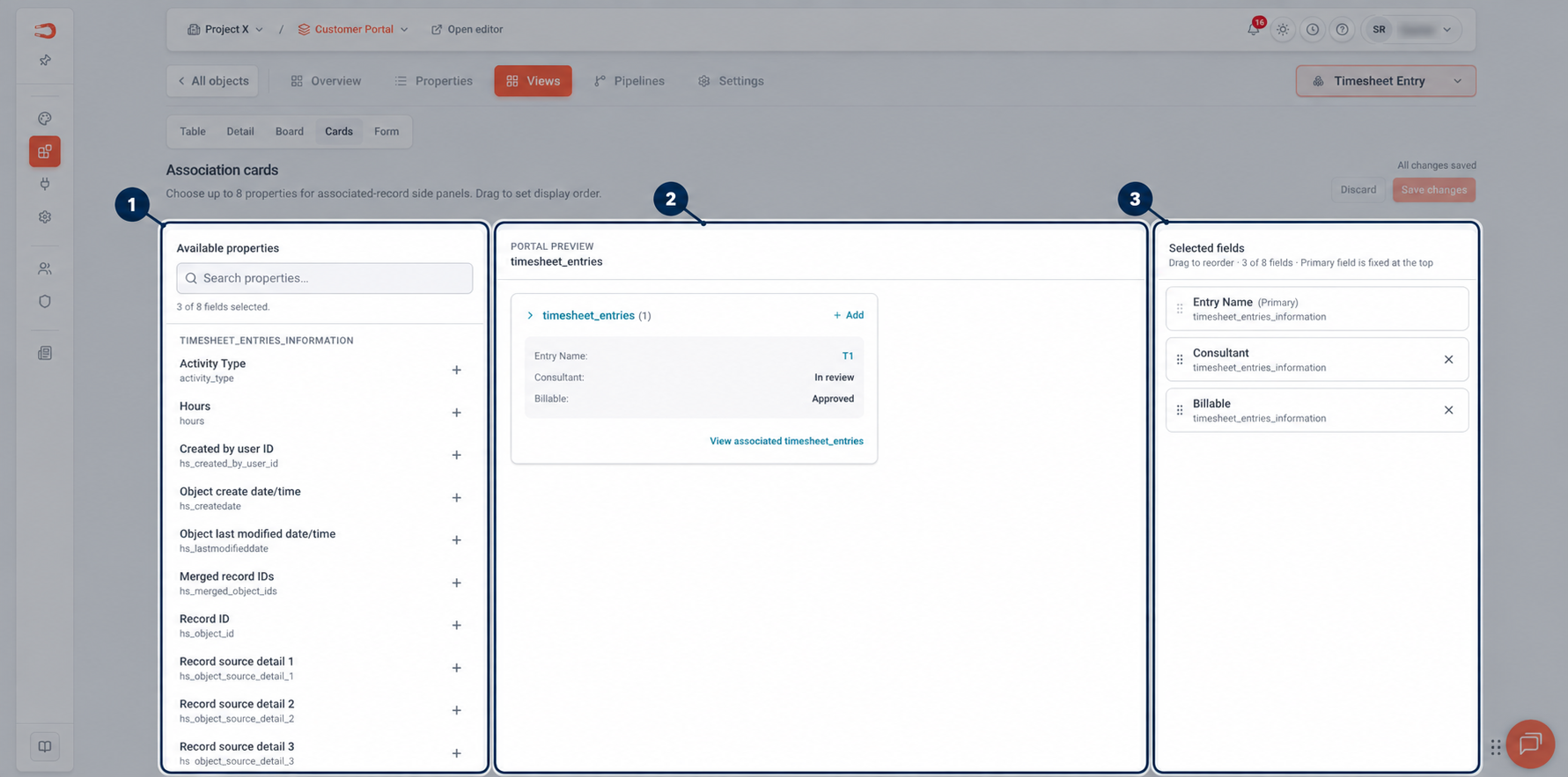
Figure: Configure an association card by selecting the related fields customers should see.